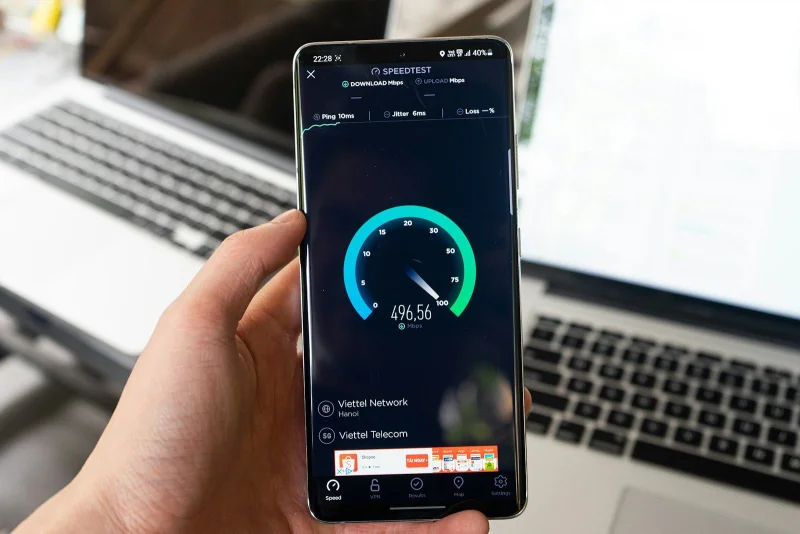
Your internet speed matters more than most people track
You pay for a certain internet plan. But what are you actually getting? ISPs advertise speeds that represent theoretical maximums under ideal conditions. Real-world performance depends on congestion, distance from the exchange, the quality of your cabling, how many devices share your connection, time of day, and routing quality. A speed test measures what you're actually receiving right now — not what the brochure promises.
What a Speed Test Measures
An internet speed test measures three core metrics:
Download speed (Mbps)
How fast data travels from the internet to your device. This affects streaming video, loading websites, downloading files, and receiving video calls. Most household use is download-heavy.
Reference points:
- 1–5 Mbps: basic browsing and SD video
- 10–25 Mbps: comfortable HD streaming, video calls
- 50–100 Mbps: multiple users, 4K streaming, large downloads
- 500+ Mbps: high-demand households, large file transfers
Upload speed (Mbps)
How fast data travels from your device to the internet. Matters for video conferencing, streaming your own content, uploading files, cloud backups, and online gaming.
Upload speeds are typically much lower than download on consumer connections. Asymmetric connections (like ADSL and most cable) deliberately prioritise download because most consumer usage is download-heavy.
Ping / Latency (ms)
The time for a packet to reach a server and return — round-trip time in milliseconds. Low ping matters for:
- Online gaming (high latency = lag)
- Video conferencing (noticeable delay in conversation)
- Real-time applications (VoIP, trading platforms, remote desktop)
Reference points:
- Under 20ms: excellent for gaming and real-time apps
- 20–50ms: good
- 50–100ms: acceptable for most uses; noticeable in gaming
- Over 150ms: real-time applications suffer; conversation feels delayed
Jitter
Variation in latency from packet to packet. Even if average ping is 30ms, if it fluctuates between 10ms and 80ms, real-time applications experience quality degradation. Consistent (low jitter) latency is as important as low average latency for video calls and gaming.
How Speed Tests Work
A speed test:
- Connects to a test server (usually the geographically closest one)
- Downloads test files of known sizes and measures how fast they arrive
- Uploads test data and measures throughput
- Sends small packets and measures round-trip time
The result represents the speed between your device and the test server at that moment. It's influenced by:
- Your connection plan and provider
- Network congestion (time of day)
- Distance to the test server
- Your device's Wi-Fi vs. wired connection
- Other devices using bandwidth simultaneously
- The test server's own capacity
How to Get Accurate Results
Use a wired connection. Wi-Fi introduces wireless interference and additional latency. For the truest measure of your ISP's connection, connect directly via Ethernet.
Close other applications and browser tabs. Background downloads, streaming, cloud sync, and updates all consume bandwidth during the test.
Test at different times. Run tests in the morning, afternoon, and evening. ISP congestion typically peaks in the evening (when everyone is home streaming). If evening speeds are significantly lower, it's congestion — a contractual issue worth raising with your ISP.
Test multiple times and average. Single tests have variability. Three to five tests in a row give a more representative average.
Test from different devices. If speeds are consistently low on one device but fast on another using the same network, the device (Wi-Fi adapter, CPU, network card) is the bottleneck.
Real-World Examples
Diagnosing a slow streaming experience
4K Netflix requires approximately 25 Mbps. A household reports buffering.
Speed test result: 18 Mbps download
Below the 25 Mbps threshold for reliable 4K. Switch to 1080p (5–8 Mbps) for reliable playback, or investigate whether speeds can be improved (router position, plan upgrade, network congestion time).
Checking value from ISP plan
You pay for a "100 Mbps fibre" plan. Speed test results over a week:
Morning: 95–100 Mbps ✓ Afternoon: 80–90 Mbps ✓ Evening: 35–50 Mbps
Evening speeds are significantly below the plan rate — classic congestion. This may be worth raising with your ISP, especially if it's persistent.
Remote work connection assessment
A remote worker needs reliable video conferencing. Requirements: 3–4 Mbps upload (per Zoom's recommendation for HD calls), sub-100ms latency.
Speed test: Upload: 2.1 Mbps, Ping: 45ms
Upload is borderline — below recommended for reliable HD. Consider reducing video quality settings or upgrading the connection. Latency is acceptable.
Comparing wired vs. Wi-Fi
Wired: 95 Mbps download, 12ms ping Wi-Fi (same room as router): 68 Mbps download, 28ms ping Wi-Fi (bedroom): 31 Mbps download, 45ms ping
The Wi-Fi in the bedroom is losing more than 60% of the connection speed due to wall attenuation. A Wi-Fi extender or mesh node in the bedroom would significantly improve the situation.
Interpreting Your Results vs. Your Plan
If speeds match your plan: Your ISP is delivering as promised. If experience still feels slow, the issue is elsewhere — Wi-Fi, device performance, or the remote server's speed (not your connection).
If speeds are consistently 10–15% below plan: Normal — test overhead and measurement variance account for minor shortfalls. Not worth pursuing with ISP.
If speeds are 20–50% below plan at off-peak times: Worth investigating. Check cables, router firmware, and connection type. Contact ISP if problem persists.
If speeds are significantly below plan at peak times: Congestion on your ISP's infrastructure. Document test results with timestamps and contact the ISP.
Tips for Better Internet Performance
Router position matters. Place your router centrally in your home, elevated, away from walls and other electronics. Wi-Fi signal degrades through walls and floors.
5GHz vs. 2.4GHz Wi-Fi: 5GHz offers higher speeds but shorter range. 2.4GHz penetrates walls better but at lower speeds. Use 5GHz when close to the router; 2.4GHz for devices at range.
Restart your router monthly. Routers accumulate connection state and can degrade over weeks. A monthly restart clears this. If speed issues coincide with long router uptime, a restart often helps.
Check for background bandwidth consumers. Smart TVs, security cameras, cloud backup services, and automatic updates can consume significant bandwidth. A network monitor app shows which devices are using bandwidth.
Frequently Asked Questions
Why is my real speed lower than advertised? ISPs advertise "up to" speeds — theoretical maximums under ideal conditions. Real-world speeds depend on network congestion, distance from infrastructure, and the quality of your home wiring. Consistent shortfalls at off-peak times may indicate a provisioning issue; peak-time shortfalls indicate congestion.
What's the minimum speed for working from home? For a single user with video calls: 25 Mbps download, 5 Mbps upload. For a household with multiple remote workers and streaming: 100 Mbps symmetric is comfortable.
Does VPN affect speed test results? Yes — VPNs add encryption overhead and routing detours, typically reducing speeds by 10–30%. For accurate ISP speed measurement, disable the VPN during testing.
What's a good speed for online gaming? Download speed matters less than latency. Even 5–10 Mbps is sufficient for most online games. The key metric is ping: under 50ms for a comfortable experience, under 20ms for competitive play.
Is the speed test free? Yes — completely free, no sign-up required.
Knowing your actual internet speed — not the advertised speed — is the starting point for any internet performance investigation. The speed test gives you a real measurement in under a minute.
Try the Speed Test free at sadiqbd.com — measure your actual download speed, upload speed, and latency right now.